
Android gaming platforms has changed significantly over the past few years. Players no longer depend on one app store or a limited selection of simple mobile games. In 2026, Android users can discover competitive multiplayer titles, casual games, independent projects, cloud based experiences and games that support progress across phones and computers.
However, every platform offers a different experience. Some Android gaming platforms focus on secure and convenient app downloads, while others provide exclusive titles, community reviews or access to computer quality games through cloud streaming. Therefore, users should compare device compatibility, regional availability, payment requirements and account security before choosing a platform.
This guide explores some of the most useful Android gaming platforms available in 2026. It also explains what Pakistani users should check before installing a new game, purchasing digital content or creating an account. You can also explore the 188PKR Game to check its Android requirements, installation process, wallet options and safety information.

What Is an Android Gaming Platform?
An Android gaming platform is a digital service that helps users find, download, purchase, manage or play games on Android devices.
A platform may work as:
- An official application store
- A game discovery community
- A cloud gaming service
- A manufacturer-specific game store
- An independent game marketplace
- A cross device gaming service
Some platforms install games directly on the phone. Others stream the game through the internet, which means the main processing takes place on a remote server rather than the users device.
The best option depends on your phone, internet connection, preferred game category, available storage and budget.
Quick Comparison of Android Gaming Platforms 2026:
| Platform | Best For | Main Requirement | Availability Notes |
|---|---|---|---|
| Google Play Store | General Android gaming | Google account | Widely accessible in Pakistan |
| Google Play Games on PC | Phone and computer gaming | Compatible Windows PC | Game availability varies |
| Samsung Galaxy Store | Samsung Galaxy users | Compatible Galaxy device | Limited to supported Samsung devices |
| Epic Games Store | Selected major titles | Compatible Android device | Android service available globally |
| TapTap | Game discovery and community | Android app or browser | Downloads vary by title and region |
| itch.io | Independent Android games | Browser and compatible APK | Users must check each developer |
| Xbox Cloud Gaming | Console-style cloud games | Subscription and supported region | Regional restrictions apply |
| GeForce NOW | Streaming supported PC games | Fast internet and supported region | Not available in every country |
1. Google Play Store
Google Play Store remains the most practical starting point for most Android users. It offers a large selection of free and paid games across categories such as action, puzzle, racing, sports, role playing, strategy and simulation.
One major advantage is convenience. Users can install games, receive updates, manage subscriptions and review previous purchases through one Google account. Pakistan is listed as a supported location for Google Play customers and transactions can be displayed in Pakistani rupees where applicable.
Google Play also gives users access to the Data Safety section. This area explains how a developer says it collects, shares and protects user information. Users can review these details before installing a game.
In addition, Google Play Protect checks apps and devices for potentially harmful behaviour. Although no automated system can guarantee complete protection, keeping Play Protect enabled adds an important security layer.

Best for:
Google Play Store is suitable for users who want:
- Easy installation and automatic updates
- A broad selection of Android games
- App ratings and user reviews
- Parental controls
- Centralised subscription management
- Basic app security checks
Before downloading, check the developers name, update history, permissions, age rating and recent reviews.
2. Google Play Games on PC
Google Play Games on PC allows users to play selected Android games on a compatible Windows computer. It can be useful for players who prefer a larger screen, keyboard controls or longer gaming sessions without relying entirely on a phone.
Google continued updating the service during 2026. Its official release notes state that selected games can support one purchase across phone, tablet and PC. Moreover, Play Pass subscribers can also access selected paid and unlocked mobile games on a computer through their existing subscription. Availability still depends on the individual game.
This service does not replace the standard Android store. Instead, it creates a connection between mobile and computer gaming for supported titles.

Best for
Consider Google Play Games on PC when you:
- Play the same game on different devices
- Want a larger display
- Prefer keyboard and mouse controls
- Have limited phone battery life
- Want official Android game support on Windows
Before installing it, check the computers processor, memory, storage and virtualisation requirements.
3. Samsung Galaxy Store and Gaming Hub
Samsung Galaxy users have another official option through Galaxy Store. The store includes games, applications, themes and manufacturer specific services. Samsung also offers selected discounts, vouchers and gaming benefits, although promotions may differ by device and country.
Galaxy Store can be useful when a game offers a version designed for Samsung devices or when a user wants to manage Samsung services through one account.
Samsung Gaming Hub, previously associated with Game Launcher on many devices, provides a central space for organising installed games. It can automatically collect supported games in one location and may offer tools for managing alerts, performance and power use.

Best for
This option is mainly suitable for:
- Samsung Galaxy phone and tablet users
- Players looking for Galaxy-specific offers
- Users who want games organised in one hub
- People who want basic performance controls
Remember that a game downloaded from Galaxy Store may use Samsung’s payment system rather than Google Play billing.
4. Epic Games Store for Android
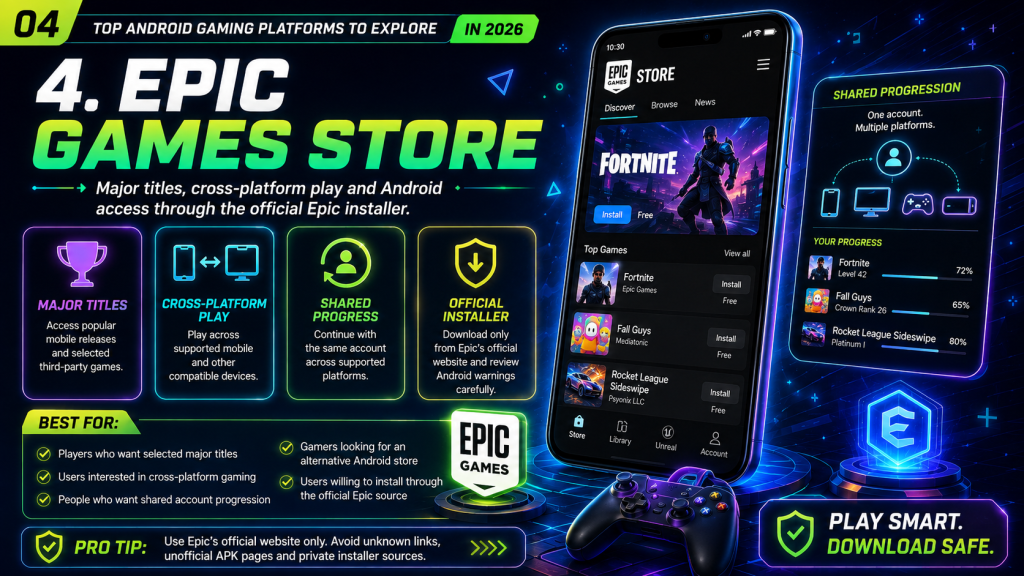
Epic Games Store has expanded beyond computers and is now available on Android. Its mobile service includes titles such as Fortnite, Fall Guys and Rocket League Sideswipe. Epic also states that third party Android games are available globally through its mobile store.
Some supported games offer cross platform play and shared account progression. This means a player may continue with the same account across mobile and other supported devices.
Unlike Google Play, the Epic Games Store may require users to download its installer directly. Therefore, it is essential to use Epic’s official website and carefully review Android’s installation warning before continuing.
Best for
Epic Games Store may appeal to users who want:
- Epic’s major mobile titles
- Cross-platform account progress
- Selected exclusive games
- An alternative Android game store
- Automatic updates through the Epic app
Never download an Epic installer from an unknown blog, social media message, shortened link or unofficial file sharing page.
5. TapTap
TapTap focuses heavily on game discovery and community interaction. Users can browse game pages, read player discussions, watch gameplay content and discover titles that may receive less attention on larger stores.
TapTap Lite is also listed on Google Play as a game-discovery application where users can explore community content and communicate about games.
However, availability can differ between regions and games. A title appearing on TapTap does not automatically mean every user can download or play it in Pakistan. Some pages may provide pre-registration, community information or links rather than an immediate download.
Best for
TapTap can be useful for:
- Discovering upcoming Android games
- Reading community discussions
- Finding regional releases
- Following developers
- Viewing gameplay opinions
Treat community reviews as personal experiences rather than confirmed facts. Verify important information through the game developer’s official page.
6. itch.io
itch.io is known for independent games and experimental projects. Its Android category allows developers to publish titles made for Android devices, including free games, paid projects, game jam entries and early concepts.
This platform is different from a heavily controlled mobile store. Many games come from small teams or individual creators. As a result, quality, compatibility, update frequency and installation methods can vary significantly.
Users should read the complete game page, developer history, comments and installation instructions before downloading an APK.
Best for
itch.io is worth exploring when you want:
- Independent Android games
- Creative or experimental projects
- Short story based experiences
- Game-jam releases
- Direct support for smaller developers
Because some files are installed outside Google Play, scan downloads, avoid unnecessary permissions and keep Android’s security features enabled.
7. Xbox Cloud Gaming
Xbox Cloud Gaming lets users stream supported games to mobile phones, tablets, computers and other compatible devices. It normally requires an eligible Xbox Game Pass subscription, a supported controller or touch controls, and a stable internet connection.
The main advantage is that users do not need to install the complete game on their phones. However, cloud gaming consumes considerable data and depends on low network delay.
Regional availability remains an important limitation. Microsoft directs users to its supported country page, and Pakistan did not appear on the official list when checked in August 2026. Users should verify the current regional status before paying for a subscription.
Best for
Xbox Cloud Gaming is most suitable for users who have:
- Official service availability in their region
- A stable high-speed connection
- A compatible controller
- An eligible Game Pass plan
- Sufficient monthly data
Avoid changing account regions or using unofficial payment sellers to bypass restrictions. This may cause billing, account or subscription problems.
8. NVIDIA GeForce NOW
GeForce NOW is another cloud gaming platform. Instead of running a supported computer game directly on an Android phone, the platform streams it from NVIDIA powered servers.
NVIDIA states that GeForce NOW can work across phones, computers, televisions and handheld devices. However, the company also clearly notes that the service is not available in every region.
Pakistan was not shown on NVIDIAs official location selector when checked in August 2026. Therefore, Pakistani users should confirm official availability before purchasing any related membership or game.
Best for
GeForce NOW can be useful for users who:
- Already own supported computer games
- Want higher-quality graphics on mobile
- Have fast and reliable internet
- Live in an officially supported region
- Do not want large local installations
Cloud performance may change according to server distance, network congestion and Wi-Fi quality.
How to Choose the Right Android Gaming Platform 2026?
The platform with the biggest game library is not automatically the best choice for every user. Consider the following factors before creating an account.
Device compatibility
Check the required Android version, processor, memory and storage. A game may install successfully but still perform poorly on an older or entry-level phone.
Internet and mobile data
Offline games are better for users with limited data. Competitive multiplayer and cloud gaming require a stable connection. Cloud services may consume much more data than ordinary mobile games.
Game selection
Choose a platform that matches your interests. Google Play offers broad variety, itch.io focuses on independent projects, while Epic provides a smaller selection of major cross-platform titles.
Payment support
Review the final price, currency, subscription renewal and refund policy before paying. Do not assume that every platform accepts JazzCash, Easypaisa, local cards or direct bank transfers.
Use only payment options displayed inside the official platform. Never transfer money to a private number received through WhatsApp, Telegram, Facebook or an unknown support account.
Account security
Create a unique password and activate two-step verification where available. Never share your password, OTP, recovery code or complete payment details with another person.
Regional availability
A game may appear online but remain unavailable in Pakistan. Moreover, cloud gaming services may support only selected countries. Check the official availability page instead of depending on an old tutorial or social-media video.
Safety Tips Before Downloading Android Games:
Follow these basic checks before installing a game from any platform:
- Confirm the official developer and platform name.
- Read recent reviews instead of looking only at the star rating.
- Check the game’s permissions.
- Review the privacy policy and Data Safety information.
- Avoid modified or “unlimited currency” APK files.
- Keep Android and security services updated.
- Start with free features before making a purchase.
- Save receipts for legitimate digital purchases.
- Do not install files sent by unknown people.
- Remove games that show suspicious pop-ups or unusual account activity.
Most importantly, Android gaming platforms should remain entertainment. Rewards, virtual coins, promotional points or competitive rankings should not be treated as employment or guaranteed income.
Advantages and Limitations:
| Advantages | Limitations |
|---|---|
| Large selection of Android games | Some games require powerful devices |
| Free and paid options are available | In-app purchases can become expensive |
| Cloud gaming reduces local installation | It requires fast, stable internet |
| Cross-device progress is becoming common | Not every title supports synchronisation |
| Community platforms improve discovery | User reviews are not always reliable |
Conclusion:
Android gaming platforms in 2026 offer more choice than a single traditional app store. Google Play remains a strong general option, while Galaxy Store adds benefits for Samsung users. Epic Games Store supports selected cross platform titles, and platforms such as TapTap and itch.io make it easier to discover community driven and independent games.
Cloud gaming also shows how Android devices can provide experiences beyond ordinary mobile downloads. However, Xbox Cloud Gaming and GeForce NOW remain dependent on regional support, internet quality and subscription requirements. Pakistani users should verify availability before spending money.
Ultimately, the best Android gaming platform is one that works properly on your device, clearly explains its costs, protects your account and offers games you genuinely enjoy. Compare platforms carefully, use official download sources and keep gaming within your personal time and spending limits.